


json-to-bpmn-xml is an ESM JavaScript / TypeScript library that converts structured JSON workflow definitions into formatted BPMN 2.0 XML with automatic diagram layout (BPMNDI). Define nodes, sequence flows, swimlanes and collaborating processes; await convert(model) returns an XML string with diagram shapes and edge waypoints.
Use it to generate BPMN diagrams from application data, export workflow configurations to modeling tools, or turn an AI-generated ProcessModel into BPMN XML. AI callers must produce the documented input structure; the library accepts structured models, not natural-language prompts.
The output includes both process elements and diagram coordinates for viewing in tools such as bpmn.io and Camunda Modeler. The library combines BPMN serialization through bpmn-moddle with ELK layout and custom orthogonal routing, including swimlanes, multiple pools, message flows and data associations.
Scope: generates diagrams, not workflow execution. Processes are emitted with isExecutable="false"; deployment to an engine requires engine-specific configuration. Input validation checks model structure and references, and repository tests parse the output with bpmn-moddle; these checks do not establish full BPMN semantic or XSD conformance. Event definitions support reusable message and signal references; runtime correlation and execution remain engine-specific.
JSON structure reference (full rules, nesting, types):
- Docs index: Documentation
- English: Input model reference
- Русский: Структура входной модели
- JSON → BPMN 2.0 XML via
bpmn-moddle - BPMN XML → supported JSON subset via
importBpmn(xml), with warnings and the unchanged source XML - Pretty-printed XML with declaration, namespaces, and
xsi:schemaLocation - Node types: start/end, task variants, expanded/event/transaction subprocesses, standard gateways, intermediate catch/throw and boundary events
- Event definitions: timer, message, signal, conditional, error, escalation, terminate, cancel, compensation, link, and multiple definitions on one event
- Reusable Message/Signal definitions: named
messages[]andsignals[]withmessageRef/signalRefon events and send/receive tasks - Reusable Error/Escalation definitions: named
errors[]andescalations[]with error/escalation codes and event references - Timer parameters:
timeDate,timeDuration, and repeatingtimeCycleexpressions - Multiple event parameters:
eventDefinitionOptionsByTypekeeps timer, message, signal, error, and escalation options independent - Boundary event semantics:
cancelActivity, attachment validation, event-specific checks, and multiple boundary events per activity - Compensation and cancel semantics:
isForCompensationhandlers, activity references, transaction cancel boundaries, and rollback paths - Multi-instance loops with sequential/parallel behavior, cardinality, completion conditions, and behavior
- Swimlanes and multi-pool collaborations with message flows
- Data stores and data objects + data input/output associations
- Text annotations, groups, and associations
- Auto layout (ELK + orthogonal edge routing, including event-gateway “compass” clusters)
- DI colors (
bioc+colorextensions, as in bpmn.io) - Validation of the input model
- TypeScript types + ESM
JSON type |
BPMN element | Notes |
|---|---|---|
start |
bpmn:StartEvent |
optional eventDefinition: "timer" | "message" |
end |
bpmn:EndEvent |
|
task |
bpmn:Task |
generic task |
userTask |
bpmn:UserTask |
|
serviceTask |
bpmn:ServiceTask |
|
manualTask |
bpmn:ManualTask |
|
sendTask |
bpmn:SendTask |
optional implementation |
receiveTask |
bpmn:ReceiveTask |
optional implementation |
scriptTask |
bpmn:ScriptTask |
optional script, scriptFormat |
businessRuleTask |
bpmn:BusinessRuleTask |
|
callActivity |
bpmn:CallActivity |
optional calledElement |
subProcess |
bpmn:SubProcess / bpmn:Transaction |
collapsed or nested; event / transaction specialization |
exclusiveGateway |
bpmn:ExclusiveGateway |
|
parallelGateway |
bpmn:ParallelGateway |
|
inclusiveGateway |
bpmn:InclusiveGateway |
|
complexGateway |
bpmn:ComplexGateway |
|
eventBasedGateway |
bpmn:EventBasedGateway |
|
intermediateCatch |
bpmn:IntermediateCatchEvent |
catch definitions |
intermediateThrow |
bpmn:IntermediateThrowEvent |
throw definitions, including link events |
boundaryEvent |
bpmn:BoundaryEvent |
requires attachedTo |
Common node options: multiInstance, eventDefinition(s), eventDefinitionOptions, dataInputs, dataOutputs, dataObjectInputs, dataObjectOutputs, laneId.
npm install json-to-bpmn-xmlimport { convert, type ProcessModel } from "json-to-bpmn-xml";
const model: ProcessModel = {
id: "process_1",
name: "Simple Process",
nodes: [
{ id: "start", type: "start" },
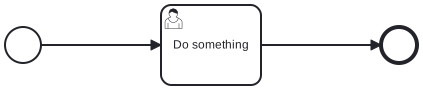
{ id: "task1", type: "userTask", name: "Do something" },
{ id: "end", type: "end" },
],
edges: [
{ id: "e1", source: "start", target: "task1" },
{ id: "e2", source: "task1", target: "end" },
],
};
const xml = await convert(model);
// → formatted BPMN 2.0 XML stringimportBpmn parses BPMN XML into the part of ProcessModel the library can currently represent. It does not promise a lossless XML → JSON → XML round trip. Keep sourceXml as the authoritative original; unknown elements and unsupported metadata remain there, not in model.
import { readFile } from "node:fs/promises";
import { convert, importBpmn } from "json-to-bpmn-xml";

const originalXml = await readFile("./invoice.bpmn", "utf8");
const { model, warnings, sourceXml } = await importBpmn(originalXml);

// Save sourceXml if the original diagram/engine extensions must be preserved.
for (const warning of warnings) console.warn(warning.code, warning.elementId, warning.message);

if (model) {
  // Only use this if a newly laid-out diagram with supported BPMN content is acceptable.
  const regeneratedXml = await convert(model);
}
Unsupported nodes and sequence/message flows connected to them are omitted together; each omission is reported. If no process can be represented, or the partial JSON cannot be regenerated, model is null while sourceXml remains intact. Malformed XML rejects with a parse error. npm run preview checks both fixtures/models/ and fixtures/xml/, writing separate json-to-bpmn/ and bpmn-to-json/ result folders. It imports all generated XML back to JSON; the reverse folder contains flat .bpmn/.json pairs and root-level coverage.md lists observed warnings and missing features. See import guide and unsupported-node fixture.
The reverse converter also restores simple data-store/data-object links, text annotations, groups, associations, and ad-hoc subprocesses from generated BPMN. Ad-hoc settings are available through subProcess.subProcessType: "adHoc", ordering, cancelRemainingInstances, and completionCondition; empty ordinary subprocesses remain connected to their sequence flows. BPMNDI geometry/colors, group metadata not serialized by the forward converter, and advanced data mappings still require the original sourceXml.
Without lanes, the diagram plane is bound to the process (no collaboration).
Assign each node to a lane with laneId. The converter will generate:
bpmn:laneSet/bpmn:lanewithflowNodeRefbpmn:collaboration+bpmn:participant(pool)- DI shapes for participant and lanes (lanes are inset so pool and lane titles do not overlap)
- Orthogonal cross-lane sequence flows
laneId is input-only — it is never written as an attribute on flow nodes in the XML.
import { convert, type ProcessModel } from "json-to-bpmn-xml";

const model: ProcessModel = {
  id: "Process_Test_Lanes",
  name: "Lane Test Process",
  lanes: [
    { id: "Lane_1", name: "User" },
    { id: "Lane_2", name: "System" },
    { id: "Lane_3", name: "External Service" },
  ],
  nodes: [
    { id: "start", type: "start", name: "Start", laneId: "Lane_1" },
    { id: "task_user", type: "userTask", name: "Fill form", laneId: "Lane_1" },
    { id: "task_system", type: "serviceTask", name: "Validate data", laneId: "Lane_2" },
    { id: "task_ext", type: "serviceTask", name: "Call API", laneId: "Lane_3" },
    { id: "end", type: "end", name: "End", laneId: "Lane_1" },
  ],
  edges: [
    { id: "e1", source: "start", target: "task_user" },
    { id: "e2", source: "task_user", target: "task_system" },
    { id: "e3", source: "task_system", target: "task_ext" },
    { id: "e4", source: "task_ext", target: "end" },
  ],
};

const xml = await convert(model);Use the advancedOrder fixture (single pool, three lanes, retry loop):
import { convert } from "json-to-bpmn-xml";
import { advancedOrder } from "./fixtures/models"; // in this repo

const xml = await convert(advancedOrder);accountsPayable is a complete Accounts Payable diagram example: 2 pools, 2 lanes, 19 nodes, 20 sequence flows, 2 message flows and 1 shared data store. Finance checks an invoice, the CFO approves it, and a separate process schedules payments. The diagram includes an event-based gateway with timer and message catches, a collapsed subprocess, sequential / parallel multi-instance activities and DI colors.
Full example walkthrough · JSON input · Generated BPMN XML · Source fixture
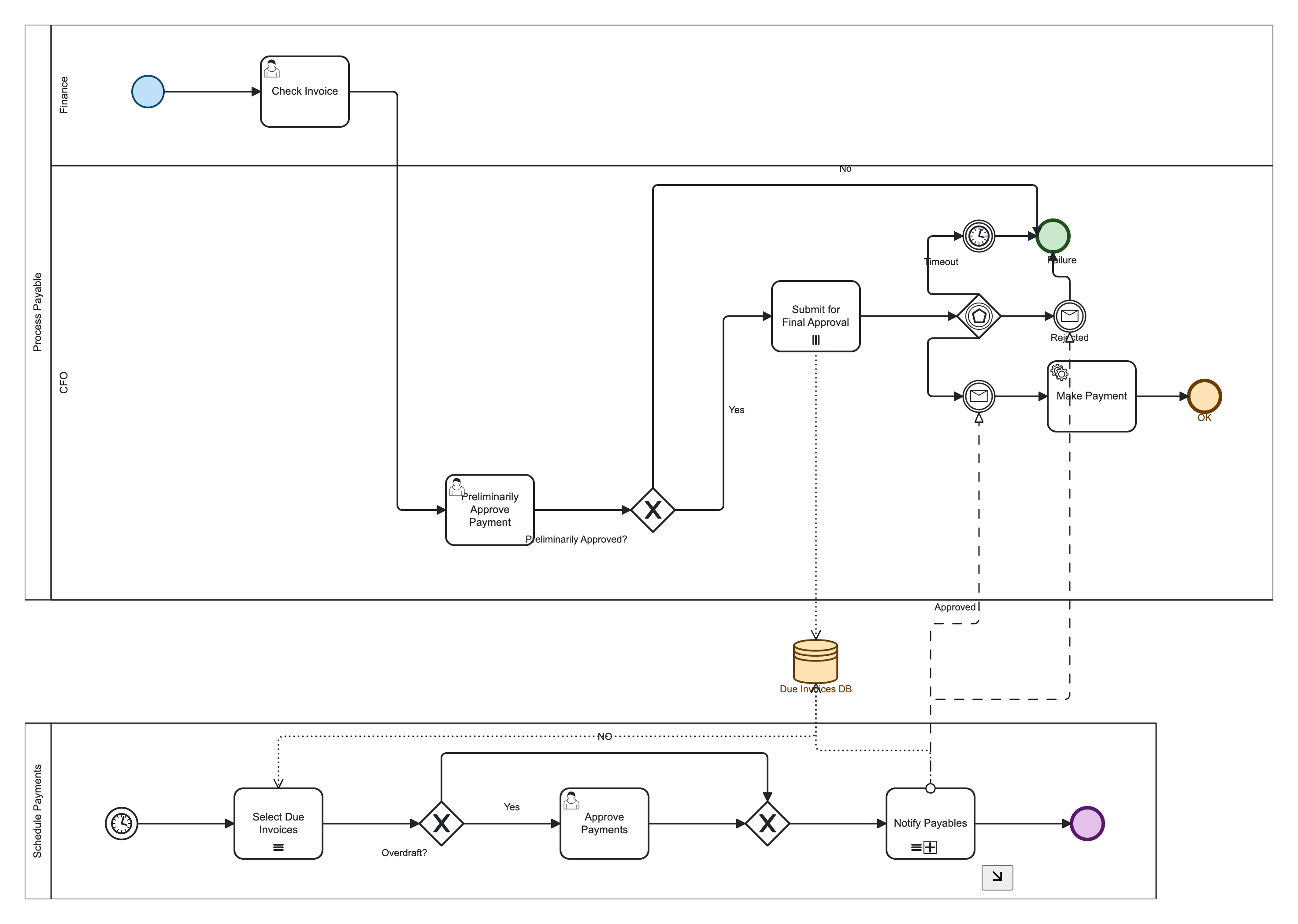
The complete JSON and generated XML are committed under docs/examples/ and included in the npm package. The fixture demonstrates diagram generation; its timer and message definitions do not configure an executable payment workflow.
npm run local
# → converts fixtures/models/accounts-payable.ts
Swap the import in scripts/local-run.ts to try incidentResponse, advancedOrder, etc.
The repository includes runnable fixtures for the main patterns used in hand-built BPMN diagrams. Tests convert every exported fixture to XML and parse it back with bpmn-moddle, requiring zero parser warnings. PNG rendering is a separate local preview command.
Use data objects when an activity creates or consumes a document:
const model: ProcessModel = {
  id: "InvoiceProcess",
  dataObjects: [
    { id: "Invoice", name: "Invoice" },
    { id: "ValidatedInvoice", name: "Validated invoice" },
  ],
  nodes: [
    { id: "start", type: "start" },
    { id: "receive", type: "receiveTask", name: "Receive invoice", dataObjectOutputs: ["Invoice"] },
    { id: "validate", type: "serviceTask", name: "Validate", dataObjectInputs: ["Invoice"], dataObjectOutputs: ["ValidatedInvoice"] },
    { id: "end", type: "end" },
  ],
  edges: [
    { source: "start", target: "receive" },
    { source: "receive", target: "validate" },
    { source: "validate", target: "end" },
  ],
};Use subProcessType: "transaction" for an atomic operation and subProcessType: "event" for a recovery handler. Event subprocesses are detached handlers: they cannot have parent sequence flows and their start events must have event definitions. Set interrupting: false for a non-interrupting handler.
const transaction: INode = {
  id: "Fulfill",
  type: "subProcess",
  name: "Fulfill order",
  subProcess: {
    subProcessType: "transaction",
    expanded: true,
    nodes: [
      { id: "txStart", type: "start" },
      { id: "reserve", type: "serviceTask", name: "Reserve stock" },
      { id: "txEnd", type: "end" },
    ],
    edges: [
      { source: "txStart", target: "reserve" },
      { source: "reserve", target: "txEnd" },
    ],
  },
};Attach a compensation event to the activity it reverses and reference the undo activity explicitly:
{
  id: "Compensate",
  type: "boundaryEvent",
  attachedTo: "ChargeCard",
  eventDefinition: "compensation",
  eventDefinitionOptions: {
    activityRef: "UndoCharge",
    waitForCompletion: false,
  },
}An event can wait for more than one trigger. Link events use the same linkName on the throw and catch sides:
{
  id: "WaitForAny",
  type: "intermediateCatch",
  eventDefinitions: ["timer", "message"],
},
// another node in the same nodes[] array
{
  id: "Jump",
  type: "intermediateThrow",
  eventDefinition: "link",
  eventDefinitionOptions: {
    linkName: "ReviewHandoff",
    linkDirection: "source",
  },
}Define messages and signals once at the model level, then reference them from event definitions or send/receive tasks:
{
  id: "OrderProcess",
  messages: [{ id: "OrderSubmitted", name: "Order submitted" }],
  signals: [{ id: "OrderApproved", name: "Order approved" }],
  nodes: [
    {
      id: "Start",
      type: "start",
      eventDefinition: "message",
      eventDefinitionOptions: { messageRef: "OrderSubmitted" },
    },
    { id: "Send", type: "sendTask", messageRef: "OrderSubmitted" },
    {
      id: "Wait",
      type: "intermediateCatch",
      eventDefinition: "signal",
      eventDefinitionOptions: { signalRef: "OrderApproved" },
    },
  ],
  edges: [
    { source: "Start", target: "Send" },
    { source: "Send", target: "Wait" },
  ],
}Define error and escalation codes once, then reference them from boundary or throw/catch events:
{
  id: "PaymentProcess",
  errors: [{ id: "PaymentDeclined", name: "Payment declined", errorCode: "PAYMENT_DECLINED" }],
  escalations: [{ id: "ManagerApproval", name: "Manager approval", escalationCode: "MANAGER_APPROVAL_REQUIRED" }],
  nodes: [
    {
      id: "ChargeError",
      type: "boundaryEvent",
      attachedTo: "ChargeCard",
      eventDefinition: "error",
      eventDefinitionOptions: { errorRef: "PaymentDeclined" },
    },
    {
      id: "Escalate",
      type: "intermediateThrow",
      eventDefinition: "escalation",
      eventDefinitionOptions: { escalationRef: "ManagerApproval" },
    },
  ],
}
Timer event definitions accept one BPMN timer expression at a time:
{ id: "StartAtDate", type: "start", eventDefinition: "timer",
  eventDefinitionOptions: { timeDate: "2026-10-12T09:00:00Z" } }
{ id: "Wait", type: "intermediateCatch", eventDefinition: "timer",
  eventDefinitionOptions: { timeDuration: "PT15M" } }
{ id: "Retry", type: "boundaryEvent", attachedTo: "Charge",
  eventDefinition: "timer",
eventDefinitionOptions: { timeCycle: "R/PT1H" } }timeDate, timeDuration, and timeCycle are emitted as BPMN formal expressions and are mutually exclusive.
For an event with several definitions, use eventDefinitionOptionsByType so each definition receives its own parameters:
{
  id: "WaitForAny",
  type: "intermediateCatch",
  eventDefinitions: ["timer", "message", "signal"],
  eventDefinitionOptionsByType: {
    timer: { timeDuration: "PT30M" },
    message: { messageRef: "InvoiceReceived" },
    signal: { signalRef: "InvoiceApproved" },
  },
}| Fixture | Demonstrates |
|---|---|
accountsPayable |
two pools, lanes, messages, event-based gateway, data store |
dataObjects |
document input/output associations |
artifacts |
text annotation, group, association |
advancedSubprocesses |
transaction and event subprocesses |
controlEvents |
cancel, compensation, link, and multiple definitions |
complexGatewayLoops |
complex gateway, loop cardinality, completion condition |
compensation |
compensation activityRef and waitForCompletion |
linkEvents |
link throw/catch pair |
Run npm run preview to render every fixture to .bpmn and .png.
Use these links to verify claims against the input contract, implementation and tests. The schema reference is prose documentation, not a machine-readable JSON Schema validator.
| Capability | Implementation / input contract | Verification |
|---|---|---|
| Node and event types, subprocesses, multi-instance | Node types, node builder | Complex fixtures |
| Multi-pool collaboration, messages, shared data store | Converter, Accounts Payable fixture | Accounts Payable test |
| Diagram layout and orthogonal routing | Layout, edge router | Routing cases, layout tests |
| DI colors | Color input type | Color tests |
| XML parsing for all exported fixtures | Fixture index | Round-trip tests |
| Model structure and reference checks | Converter validation | Converter tests |
Run npm test for these checks and npm run build to build the published JavaScript and TypeScript declarations.
Main entry. Builds a BPMN model, computes layout, serializes and formats XML.
Class API if you prefer an instance:
import { BpmnConverter } from "json-to-bpmn-xml";

const converter = new BpmnConverter();
const xml = await converter.convert(model);import type {
ProcessModel,
IProcessDef,
INode,
IEdge,
ILane,
IMessageFlow,
IDataStore,
IDataObject,
ITextAnnotation,
IGroup,
IAssociation,
DiColor,
NodeType,
EventDefinition,
} from "json-to-bpmn-xml";Supports simple (one process) and collaboration (many pools) shapes.
Full field-by-field rules, nesting, validation, and examples:
English · Русский
type ProcessModel = {
  id: string;
  name?: string;

  // --- Simple mode (single process) ---
  lanes?: { id: string; name: string }[];
  nodes?: INode[];
  edges?: IEdge[];

  // --- Collaboration mode ---
  processes?: {
    id: string;
    name?: string;
    participantId?: string;
    participantName?: string;
    lanes?: { id: string; name: string }[];
    nodes: INode[];
    edges: IEdge[];
  }[];
  messageFlows?: { id?: string; source: string; target: string; name?: string }[];
  dataStores?: { id: string; name?: string }[];
  dataObjects?: { id: string; name?: string; isCollection?: boolean }[];
  textAnnotations?: ITextAnnotation[];
  groups?: IGroup[];
  associations?: IAssociation[];
};

type INode = {
  id: string;
  type: NodeType;
  name?: string;
  laneId?: string;
  eventDefinition?: EventDefinition;
  eventDefinitions?: EventDefinition[];
  eventDefinitionOptions?: {
    activityRef?: string;
    waitForCompletion?: boolean;
    linkName?: string;
    linkDirection?: "source" | "target";
  };
  multiInstance?: boolean | {
    sequential?: boolean;
    loopCardinality?: string | number;
    completionCondition?: string;
    behavior?: "All" | "One" | "Complex";
  };
  dataInputs?: string[];  // data store ids
  dataOutputs?: string[]; // data store ids
  /** bpmn.io bioc + OMG color on the DI shape */
  color?: { stroke?: string; fill?: string };
};

// dataStores[] also accept optional `color`Optional color on nodes and data stores is written onto bpmndi:BPMNShape:
{ id: "start", type: "start", color: { stroke: "#0d4372", fill: "#bbdefb" } }<bpmndi:BPMNShape … bioc:stroke="#0d4372" bioc:fill="#bbdefb"
color:background-color="#bbdefb" color:border-color="#0d4372">Namespaces xmlns:bioc / xmlns:color are added only when at least one color is present.
npm run local
# → converts fixtures/models/accounts-payable.ts by default
Edit scripts/local-run.ts to import any fixture from fixtures/models.
Render every fixture to .bpmn + .png (white padding, no artificial border). Layout/conversion is unchanged — padding is image-only.
npm run preview:setup   # once: install Puppeteer Chrome
npm run preview         # → previews/YYYY-MM-DD_HH-mm-ss/*.bpmn + *.png
previews/ is gitignored. Details: docs/README.md.
<?xml version="1.0" encoding="UTF-8"?>
<bpmn:definitions
  xmlns:bpmn="http://www.omg.org/spec/BPMN/20100524/MODEL"
  xmlns:bpmndi="http://www.omg.org/spec/BPMN/20100524/DI"
  xmlns:dc="http://www.omg.org/spec/DD/20100524/DC"
  xmlns:di="http://www.omg.org/spec/DD/20100524/DI"
  xmlns:xsi="http://www.w3.org/2001/XMLSchema-instance"
  id="process_1_definitions"
  targetNamespace="http://www.omg.org/spec/BPMN/20100524/MODEL"
  xsi:schemaLocation="http://www.omg.org/spec/BPMN/20100524/MODEL BPMN20.xsd">
  <bpmn:process id="process_1" name="Simple Process" isExecutable="false">
    <bpmn:startEvent id="start">
      <bpmn:outgoing>e1</bpmn:outgoing>
    </bpmn:startEvent>
    <bpmn:userTask id="task1" name="Do something">
      <bpmn:incoming>e1</bpmn:incoming>
      <bpmn:outgoing>e2</bpmn:outgoing>
    </bpmn:userTask>
    <bpmn:endEvent id="end">
      <bpmn:incoming>e2</bpmn:incoming>
    </bpmn:endEvent>
    <bpmn:sequenceFlow id="e1" sourceRef="start" targetRef="task1"/>
    <bpmn:sequenceFlow id="e2" sourceRef="task1" targetRef="end"/>
  </bpmn:process>
  <bpmndi:BPMNDiagram id="BPMNDiagram_1">
    <bpmndi:BPMNPlane id="BPMNPlane_1" bpmnElement="process_1">
      <!-- shapes + orthogonal edges -->
    </bpmndi:BPMNPlane>
  </bpmndi:BPMNDiagram>
</bpmn:definitions>Root elements include collaboration (pool) and process with laneSet:
<bpmn:collaboration id="Collab_Process_Test_Lanes">
  <bpmn:participant
    id="Participant_Process_Test_Lanes"
    name="Lane Test Process"
    processRef="Process_Test_Lanes"/>
</bpmn:collaboration>

<bpmn:process id="Process_Test_Lanes" name="Lane Test Process" isExecutable="false">
  <bpmn:laneSet id="LaneSet_1">
    <bpmn:lane id="Lane_1" name="User">
      <bpmn:flowNodeRef>start</bpmn:flowNodeRef>
      <bpmn:flowNodeRef>task_user</bpmn:flowNodeRef>
      <bpmn:flowNodeRef>end</bpmn:flowNodeRef>
    </bpmn:lane>
    <!-- … -->
  </bpmn:laneSet>
  <!-- flow nodes + sequenceFlows -->
</bpmn:process>
Diagram plane is bound to the collaboration. Participant and lane shapes use isHorizontal="true"; lane bounds start after the pool header strip so titles do not collide.
| Mode | Behavior |
|---|---|
| No lanes | ELK layered layout; plane → process |
| With lanes | ELK for horizontal order; column packing in lanes; plane → collaboration |
| Multi-pool | Pools stacked vertically; data stores sit in the inter-pool gap |
Edge routing (generic heuristics, not diagram-specific):
- Orthogonal (90°) waypoints only
- Forward cross-lane links: side docks (
right→left) or vertical drop when aligned - Long skip / bypass edges: clear channel above obstacles, enter target from the top
- Backward loops: route around stacked nodes; approach the dock from outside the shape
- Exclusive / parallel gateways (diamond): docks only at vertices; fan-out uses compass sides (
top/right/bottom) instead of stacking on one face - Small end events (≤40px): several inbound flows share one left-center axis (same dock), so tips do not stack as separate arrowheads; mid-channels may still diverge before the merge
- Event-based gateway: timer catch above, first message below, further messages to the right (compass cluster); shared failure ends stack above the side message
- Message flows / data associations: bridge routing through the pool gap, avoiding data-store boxes
- Larger nodes with several docks on one side still use spaced slots on that face
Coordinates are deterministic for a given model (good for tests / snapshots). Exact numbers can change if layout constants or ELK options change.
npm run example:simple    # process without lanes
npm run example:lanes     # three lanes
npm run example:gateway   # exclusive gateway
npm run example:service   # service task
npm run example:accounts  # accounts payable collaboration
npm run local             # default: accounts-payable fixture (edit script to switch)
npm run preview:setup     # once: Puppeteer Chrome for PNG previews
npm run preview           # all fixtures → previews/<timestamp>/*.bpmn + *.png
npm test
npm run build| Path | Description |
|---|---|
examples/ |
Runnable demo scripts |
fixtures/models/ |
Reusable ProcessModel fixtures, for local-run, preview, and tests |
scripts/local-run.ts |
Dev runner — import any fixture and print XML |
scripts/render-fixtures.ts |
Preview runner — convert all fixtures to BPMN + PNG |
previews/ |
Generated preview folders (gitignored) |
docs/ |
JSON schema docs + docs index |
tests/ |
Vitest suite |
src/ |
Library source (published via dist/) |
| Export | File | Purpose |
|---|---|---|
lanesSingleNode |
lanes-single-node.ts |
Three lanes, one start event |
lanesSimpleFlow |
lanes-simple-flow.ts |
Start → task → end in one lane |
orderCrossLane |
order-cross-lane.ts |
Cross-lane flow with gateway |
advancedOrder |
advanced-order.ts |
Single-pool demo (retry loop, packing, delivery) |
accountsPayable |
accounts-payable.ts |
Complex: 2 pools, lanes, event gateway, messages, data store |
incidentResponse |
incident-response.ts |
Complex: Support Desk + Operations collaboration |
processPayable |
process-payable.ts |
Simplified single-pool payable slice |
schedulePayments |
schedule-payments.ts |
Simplified schedule-payments slice |
exclusiveFanoutUpForward |
exclusive-fanout-up-forward.ts |
Exclusive GW fan-out (up + forward) |
crossLaneSparseDrop |
cross-lane-sparse-drop.ts |
Sparse cross-lane drop layout |
parallelSplitJoin |
parallel-split-join.ts |
Parallel split / join |
exclusiveThreeWay |
exclusive-three-way.ts |
Three-way exclusive with labels |
timerStartSimple |
timer-start-simple.ts |
Timer start |
messageStartSimple |
message-start-simple.ts |
Message start |
subprocessAndMultiInstance |
subprocess-and-multi-instance.ts |
Collapsed subProcess + multi-instance |
gatewayFanoutJogs |
gateway-fanout-jogs.ts |
Exclusive fan-out without detached stubs |
sharedEndDualIncoming |
shared-end-dual-incoming.ts |
Two paths → one End (shared axis) |
gatewayLongLabel |
gateway-long-label.ts |
Long gateway label placement |
gatewayMultiToSameEnd |
gateway-multi-to-same-end.ts |
Rejected/Timeout → shared End |
gatewayYesNoCross |
gateway-yes-no-cross.ts |
Yes right / No bottom on diamond |
gatewayJoinBypassTop |
gateway-join-bypass-top.ts |
Bypass over top into join |
messageSignalReferences |
message-signal-references.ts |
Reusable Message/Signal definitions and references |
errorEscalationReferences |
error-escalation-references.ts |
Reusable Error/Escalation definitions and codes |
timerParameters |
timer-parameters.ts |
Timer date, duration, and repeating cycle |
multipleEventParameters |
multiple-event-parameters.ts |
Independent parameters for timer, message, and signal definitions |
boundarySemantics |
boundary-semantics.ts |
Multiple interrupting and non-interrupting boundary events |
compensationCancelSemantics |
compensation-cancel-semantics.ts |
Transaction cancel boundary and compensation handler |
Complex fixtures (accountsPayable, incidentResponse) share patterns: swimlanes, eventBasedGateway + timer/message catches, exclusive bypass, message flows, and a shared data store. Routing regressions above are covered by tests/routing-cases.test.ts.
Switch the model in scripts/local-run.ts:
import { convert } from "../src/index";
import { accountsPayable } from "../fixtures/models";
// import { incidentResponse } from "../fixtures/models";
// import { advancedOrder } from "../fixtures/models";

const xml = await convert(accountsPayable);
console.log(xml);
Or render all fixtures as images:
npm run preview- bpmn-moddle — BPMN model + XML serialization
- elkjs — graph layout (layered)
- xml-formatter — readable XML output
- bpmn-to-image — fixture PNG previews (dev)
Use the bug report form. Include the package version, actual and expected behavior, and a minimal ProcessModel with the conversion call or another runnable reproduction. For diagram problems, include the affected node / flow IDs, viewer version, generated BPMN XML and a screenshot when available. Reports may be written in English or Russian.
Use under the terms of the Apache-2.0.