
Resize images, create video thumbnails, capture web pages, and generate Open Graph images, made with ❤ by Feri Irawan at 28/12/2022
GET /
The query strings are:
| Name | Description |
|---|---|
url |
The Image URL |
s (optional) |
The size will be generate. For example s=100x100 |
fit (optional) |
How a fixed size is filled: fill (default), cover, or contain. See fit |
f (optional) |
The output format: jpeg (default, also jpg), png, or webp |
q (optional) |
The quality for jpeg and webp, from 1 to 100. Default: 85 |
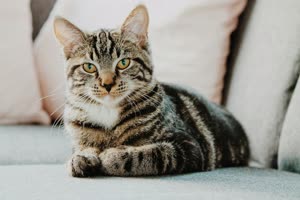
You can use the ? mark, like this: s=?x200. This means the width will be auto and the height will be 200px.
Example:
https://fiimage.vercel.app/?s=?x200&url=https://images.unsplash.com/photo-1518791841217-8f162f1e1131
Output:
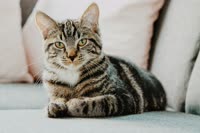
Similar to auto width, you can also use the ? mark, like this: s=200x?
Example:
https://fiimage.vercel.app/?s=200x?&url=https://images.unsplash.com/photo-1518791841217-8f162f1e1131
Output:
You can use s=300x300, that means the width will be 300px and height will be 300px.
Example:
https://fiimage.vercel.app/?s=300x300&url=https://images.unsplash.com/photo-1518791841217-8f162f1e1131
Output:

When both width and height are set, fit decides how the image fills that size:
fit |
Result |
|---|---|
fill (default) |
Stretches the image to exactly the size |
cover |
Fills the size and crops the center, keeping the aspect ratio |
contain |
Fits the whole image inside the size, so the result may be smaller |
Sizes with ? always keep the aspect ratio, so fit does not change them.
Example:
https://fiimage.vercel.app/?s=300x300&fit=cover&url=https://images.unsplash.com/photo-1518791841217-8f162f1e1131
Output:

Use f to choose jpeg, png, or webp. WebP is usually much smaller than JPEG, and PNG and WebP keep transparency. Use q to trade quality for size in JPEG and WebP.
Example:
https://fiimage.vercel.app/?s=300x300&fit=cover&f=webp&q=80&url=https://images.unsplash.com/photo-1518791841217-8f162f1e1131
Output:

GET /
The query strings are:
| Name | Description |
|---|---|
url |
The Video URL |
s (optional) |
The thumbnail size (similar to image resize) |
t (optional) |
The time (in seconds) of the video that will be used to generate the thumbnail |
fit, f, q (optional) |
The fit, format, and quality, as for images |
Example:
https://fiimage.vercel.app/?s=300x?&t=5&url=https://www.w3schools.com/tags/mov_bbb.mp4
Output:
GET /capture
Capture a public web page as an image, JPEG by default. The s parameter controls the browser viewport size and defaults to 640x480.
The query strings are:
| Name | Description |
|---|---|
url |
The web page URL |
s (optional) |
The viewport size, for example s=1280x720 |
fullPage (optional) |
Capture the whole page instead of only the viewport: fullPage=1. Up to 4096 pixels high |
delay (optional) |
Extra time to wait before capturing, in milliseconds: delay=2000. Up to 10000 |
dark (optional) |
Ask the page for its dark mode (prefers-color-scheme: dark): dark=1 |
f (optional) |
The output format: jpeg (default, also jpg), png (lossless), or webp (smallest) |
q (optional) |
The quality for jpeg and webp, from 1 to 100. Default: 85 |
Example:
https://fiimage.vercel.app/capture?s=1280x720&url=https://example.com
Output:
fullPage=1scrolls through the page first so lazy-loaded images appear, then captures its whole height, up to 4096 pixels.delay=2000waits two more seconds after the page has loaded, for animations or content that appears late.dark=1captures sites that support dark mode in their dark theme.
They can be combined:
https://fiimage.vercel.app/capture?s=1280x720&fullPage=1&dark=1&url=https://nodejs.org/en
Use f=png for lossless screenshots with perfectly sharp text, or f=webp for the smallest files. Very long or image-heavy full pages can exceed the 4 MB response limit; f=webp or a smaller s width helps.
https://fiimage.vercel.app/capture?s=1280x720&fullPage=1&f=webp&url=https://nodejs.org/en
GET /og
The query strings are:
| Name | Description |
|---|---|
url |
Your web URL (must start with https:// or http://) |
template (optional) |
The template, from 0 (default) to 8. See the templates below |
image (optional) |
A photo for the Photo template, instead of one from your page |
The image content is read from your page:
| Content | Source, in order of preference |
|---|---|
| Title | og:title, twitter:title, <title>, then the hostname |
| Description | og:description, twitter:description, <meta name="description"> |
| Icon | apple-touch-icon, then icon links (PNG, JPEG, WebP, or GIF; ICO and SVG are skipped) |
| URL | The url you pass, without its query string or fragment |
| Photo | Template 8 only. See the Photo template |
Example:
https://fiimage.vercel.app/og?template=6&url=https://github.com/feri-irawan/fiimage
Each image below is this repository's page, rendered live with template=N. Without template, 0 is used.
0 Clean (default) |
1 Split |
2 Terminal |
3 Poster |
4 Browser |
5 Bold |
6 Cover |
7 Spine |
template=8 fills the image with a photo and sets the title over it. fiimage uses the first of these photos that loads:
- The
imageyou pass - Your page's
og:imageortwitter:image - The first large image in your page's
<article>or<main>, then anywhere on the page
Images smaller than 200 pixels, SVGs, and Open Graph images from fiimage itself are skipped. Without a photo, the background stays dark. This template takes a little longer than the others, because fiimage downloads the photo too.
Examples:
https://fiimage.vercel.app/og?template=8&url=https://github.com/feri-irawan/fiimage&image=https://images.unsplash.com/photo-1518791841217-8f162f1e1131?w=1200
https://fiimage.vercel.app/og?template=8&url=https://en.wikipedia.org/wiki/Komodo_dragon
 |
|
Your own photo, with image |
The photo found on the page |
The second example shows content from the Wikipedia article Komodo dragon, under CC BY-SA 4.0. Its photo comes from Wikimedia Commons, under the license shown on the article's image page.
If you wish to contribute to this project, please create a pull request and follow the contribution guidelines.
This project is licensed under the MIT license.
Thank you, and hope it proves useful. Feel free to report issues or provide suggestions.