Skip to content

macos: Blur the window background with Window.setBackgroundAppearance - #484

Open
TianZuo555 wants to merge 1 commit into
longbridge:mainfrom
TianZuo555:feat/macos-window-material
Open

TianZuo555 wants to merge 1 commit into
longbridge:mainfrom
TianZuo555:feat/macos-window-material

Conversation

@TianZuo555

@TianZuo555 TianZuo555 commented Oct 26, 2026 •

Copy link
Copy Markdown

Fixes #417.

Summary

Adds Window.setBackgroundAppearance("opaque" | "blurred") to nsh/desktop, matching GPUI's WindowBackgroundAppearance. On macOS, "blurred" displays the sidebar material behind the content view so the desktop shows through transparent app areas.

Changes

  • nsh-core: Add WindowBackgroundAppearance enum (Opaque, Blurred) and the SetBackgroundAppearance command to the desktop module.
  • nsh-platform-macos:
    • Add an NSVisualEffectView with BehindWindow blending and Sidebar material behind the window's content view.
    • Position the backdrop at the back of the content view instead of NSThemeFrame. Under a hidden title bar, the content view fills the window and covers the title bar area; under a standard title bar, the system title bar keeps its native look.
    • Make navigation page backdrops transparent when the window background is blurred, so the blur exposes behind unstyled NavPages.
    • Update backdrops on the initial batch and subsequent appearance changes.
    • Reset the window background to opaque when the app stops.
  • nsh-platform-gpui, nsh-platform-linux, nsh-platform-windows: Implement stubs for SetBackgroundAppearance.
  • Docs: Update docs/dev/macos.md, docs/dev/js-modules.md, docs/dev/gpui.md, and user-facing docs in website/modules/nsh-desktop.md and website/zh-CN/modules/nsh-desktop.md.
  • Compat: Add tests/compat/cases/macos/window-background.tsx and register it in tests/compat/cases/macos/script.txt.

Public API

  • Window.setBackgroundAppearance(appearance: "opaque" | "blurred"): void in nsh/desktop: Sets whether the window background is opaque or blurred.
  • Rust nsh_core::desktop::WindowBackgroundAppearance: Opaque, Blurred.

Validation

  • cargo test -p nsh-platform-macos --test macos: all 9 window background appearance checks pass.
  • cargo clippy -p nsh-platform-macos --tests: passes with 0 warnings.
  • cargo +nightly fmt --all: code is formatted.

@chatgpt-codex-connector

chatgpt-codex-connector Bot commented Oct 26, 2026 •

Copy link
Copy Markdown

Codex Review Summary

This comment shows the latest Codex review activity on this pull request.

Review Status Commit Review trigger
📝 Code Review 🔄 Running since 2026-10-27T08:05:42.999449Z 9a53bf3 Manual request
ℹ️ About Codex in GitHub

Your team has set up Codex to review pull requests in this repo. Reviews are triggered when you

  • Open a pull request for review
  • Mark a draft as ready
  • Comment "@codex review" or "@codex security review".

Codex reacts with 👀 while any review is running, comments if it has suggestions, and reacts with 👍 once all reviews finish with no findings.

@huacnlee huacnlee left a comment

Copy link
Copy Markdown
Member

Choose a reason for hiding this comment

The reason will be displayed to describe this comment to others. Learn more.

Static inspection only; no macOS visual/runtime reproduction.

Reviewed by ChatGPT on behalf of @huacnlee.

Comment thread crates/nsh-platform-macos/src/chrome.rs Resolved
@huacnlee

Copy link
Copy Markdown
Member
image

Is this correct?

@huacnlee

Copy link
Copy Markdown
Member

Code review

I ran it with a small app that calls Window.setMaterial("sidebar"), using nsh run --target macos. The content area shows the material and opaque views stay opaque. I only checked sidebar; I did not take screenshots of the other materials or of switching back to none.

Found these issues:

  1. With the default title bar, the title bar becomes fully transparent and is not blurred. The window background is set to clear, but the effect view is a subview of the root, so it does not cover the title bar. On screen, the windows behind show through the title bar in full detail, with the traffic lights and the title drawn over them. The effect view needs to cover the window's whole frame, for example at the bottom of the content view's superview, or the window needs FullSizeContentView while it has a material.

};
let parent = surface.root.ns();
let mtm = MainThreadMarker::from(&*window);
let view = NSVisualEffectView::initWithFrame(NSVisualEffectView::alloc(mtm), parent.bounds());
view.setBlendingMode(NSVisualEffectBlendingMode::BehindWindow);
view.setState(NSVisualEffectState::Active);
view.setMaterial(ns_material);
view.setIdentifier(Some(ns_string!("nsh.material")));
view.setAutoresizingMask(
NSAutoresizingMaskOptions::ViewWidthSizable | NSAutoresizingMaskOptions::ViewHeightSizable,
);
parent.addSubview_positioned_relativeTo(&view, NSWindowOrderingMode::Below, None);
let host = host.unwrap_or_else(|| HostWindow {

  1. docs/dev/macos.md does not describe what the code does. The doc says the view goes "below the root view in its superview", but the code adds it as the root's bottom subview.

nsh/docs/dev/macos.md

Lines 157 to 159 in 6ee112c

| Environment | `system.rs` | Color scheme: the app's appearance when it forces one, else the root's effective appearance (the root's appearance is set to the app's, so hosted controls follow); locale and RTL from `NSLocale`, reduce motion and VoiceOver from `NSWorkspace` (live), the backing scale factor (again when the window moves to another screen: `pixelRatio()`), the OS version; `platform.os` `"macos"`, idiom `desktop`, font scale 1, safe area and keyboard height 0 |
| Window chrome (`nsh/desktop`) | `chrome.rs` | `setTitle`; a hidden title bar is `FullSizeContentView` with a transparent, untitled title bar (the traffic lights stay), its area (native frame geometry, including `contentLayoutRect` for a toolbar, and the zoom button's right edge + 8) reported as the environment's `title_bar`, 0 in full screen; a left press on a `windowDrag` view calls `performWindowDragWithEvent:` and a double click does what `AppleActionOnDoubleClick` says (zoom by default), the press never reaching the app; `setFrame` merges the fields given with the window's frame and calls `setFrame:display:animate:` (`x`/`y` are the bottom left corner's screen coordinates; `anchorTop` keeps the top edge when `height` changes without a `y`), `setLevel` maps to an `NSWindowLevel` (`desktopIcon` is `kCGDesktopIconWindowLevel`, and it also makes the window stationary on every space, out of Mission Control and Cmd+`); `setMaterial` adds an `NSVisualEffectView` (`BehindWindow`, active) below the root view in its superview and makes the window non-opaque with a clear background (`none` removes both); `orderFront` deminiaturizes, activates the app and makes the window key; the application menu replaces the main menu (its first submenu is the app menu; the replaced one comes back with `null`), context menus are `popUpMenuPositioningItem:atLocation:inView:` from the main queue (they track the mouse in a loop of their own); role items send AppKit's standard actions down the responder chain and are not reported, the others target an `NshMenuTarget` that reports their tag; AppKit validates the items (roles are enabled and titled by the responder chain: `Undo Typing`, `Exit Full Screen`), a disabled item's action is one nothing answers; an app's bar height selects an empty `NSToolbar` (`UnifiedCompact` up to 44pt, `Unified` above), with AppKit laying out the traffic lights on every live-resize frame; `titleBar().height` reports the actual unobscured-content boundary from `contentLayoutRect`, refreshed after deferred layout; a host's existing toolbar and style stay untouched; NSH tracks its own toolbar by object identity and restores the window's previous style when removing it, moving between windows or dropping the surface |

  1. There is no compat case. AGENTS.md says "A new API lands with its test, a case in tests/compat/cases/<domain>/ whose script checks it". tests/compat/cases/macos already exists and could cover Window.setMaterial.

  2. The zh-CN page website/zh-CN/modules/nsh-desktop.md is not updated. AGENTS.md asks for doc changes to update "the user-facing pages in website/ (English and zh-CN)".

| `setLevel(level)` | | On macOS and Windows, `"floating"` keeps the window above normal windows and `"normal"` restores the normal level. `"desktopIcon"` selects macOS's desktop icon level (the window also sits on every space, out of Mission Control and Cmd+`); on Windows it moves the window to the bottom of the current z-order, where later activation can raise it. |
| `setMaterial(material)` | | On macOS, makes the window translucent: the blurred desktop shows through every part of the window that the app does not paint (give the root view a transparent background). `"none"` makes the window opaque again. Other platforms ignore it. |
| `orderFront()` | | Brings the window to the front of its level and focuses it (the app activates; macOS deminiaturizes, Windows restores minimized windows and sets foreground, GTK presents). The window keeps its level. On macOS, desktop-level surfaces stay behind other windows. GPUI activates its window; the window manager controls foreground requests on Linux. |

  1. The commit subjects have no area. AGENTS.md: "Subjects and PR titles are <area>: <What the change does>". For example: macos: Add Window.setMaterial for a translucent window.

  2. API naming (a design question). The values are AppKit's NSVisualEffectMaterial names, but they are exported from the cross-desktop nsh/desktop. Windows 11 has Mica and Acrylic, which these could map to later. The names are frozen once 0.3.0 is recorded, so it may be worth choosing names that are not tied to AppKit now.

  3. Embedding. When an embedded AppView calls this, it changes the host's NSWindow opacity and background color. The code restores them afterwards, but the host window is still changed, so this should be documented, or the call ignored when the surface is embedded.

🤖 Generated with Claude Code

@huacnlee huacnlee left a comment

Copy link
Copy Markdown
Member

Choose a reason for hiding this comment

The reason will be displayed to describe this comment to others. Learn more.

The earlier layering and host-window restoration issues are addressed by static inspection. The new regression test has a separate threading issue; no macOS runtime reproduction was performed.

Reviewed by ChatGPT on behalf of @huacnlee.

Comment thread crates/nsh-platform-macos/src/chrome.rs Resolved
@TianZuo555
TianZuo555 marked this pull request as draft October 26, 2026 08:14
@TianZuo555

Copy link
Copy Markdown
Author
image Is this correct?

sry i tested this with title bar hide, my bad...
image

@TianZuo555
TianZuo555 force-pushed the feat/macos-window-material branch 2 times, most recently from c608788 to a35ff3a Compare October 27, 2026 07:31
@TianZuo555 TianZuo555 changed the title Add Window.setMaterial for a translucent macOS window macos: Blur the window background with Window.setBackgroundAppearance Oct 27, 2026
@TianZuo555
TianZuo555 force-pushed the feat/macos-window-material branch from a35ff3a to 4b51560 Compare October 27, 2026 07:45
@TianZuo555
TianZuo555 marked this pull request as ready for review October 27, 2026 07:59
@TianZuo555

TianZuo555 commented Oct 27, 2026 •

Copy link
Copy Markdown
Author

We resolved all review findings.

Changes Summary

  • API alignment: Renamed the API to Window.setBackgroundAppearance("opaque" | "blurred") to match GPUI's WindowBackgroundAppearance.
  • Backdrop placement: Attached the NSVisualEffectView to the back of the content view. Under a hidden title bar, it fills the full window. Under a standard title bar, the system title bar keeps its native style.
  • Navigation pages: Made navigation page backdrops transparent when the window background is blurred. The blur effect now shows behind unstyled NavPage components.
  • Initial batch update: Fixed follow_appearance so that the backdrop color updates during the initial mount batch.
  • Host window state: Kept host window properties unchanged. The background resets to opaque when the app stops.
  • Documentation and compat: Updated docs/dev/macos.md, docs/dev/js-modules.md, website/modules/nsh-desktop.md, and website/zh-CN/modules/nsh-desktop.md. Added a compatibility test case in tests/compat/cases/macos/window-background.tsx.

Architectural Note: Window View vs Content View

The initial implementation modified the NSWindow directly:

  • It set window.setOpaque(false) and attached the visual effect view to the superview of the root view (NSThemeFrame).
  • This caused private API warnings (adding an unknown subview).
  • It also caused a defect with a standard title bar: the title bar became fully clear instead of blurred.
  • In embedded environments, mutating the NSWindow corrupted the host window state.

Final Decision:

  • We attach the NSVisualEffectView at the back of the window's contentView.
  • With a hidden title bar, FullSizeContentView expands the contentView over the full window. The blur covers the title bar area correctly.
  • With a standard title bar, the system title bar keeps its native appearance.
  • NSH clears only its own Surface background. It leaves the host NSWindow untouched.
  • This design matches GPUI, where the host application owns the window background.

Validation

  • cargo test -p nsh-platform-macos --test macos: all 9 window background appearance checks pass.
  • cargo clippy -p nsh-platform-macos --tests: passes with zero warnings.
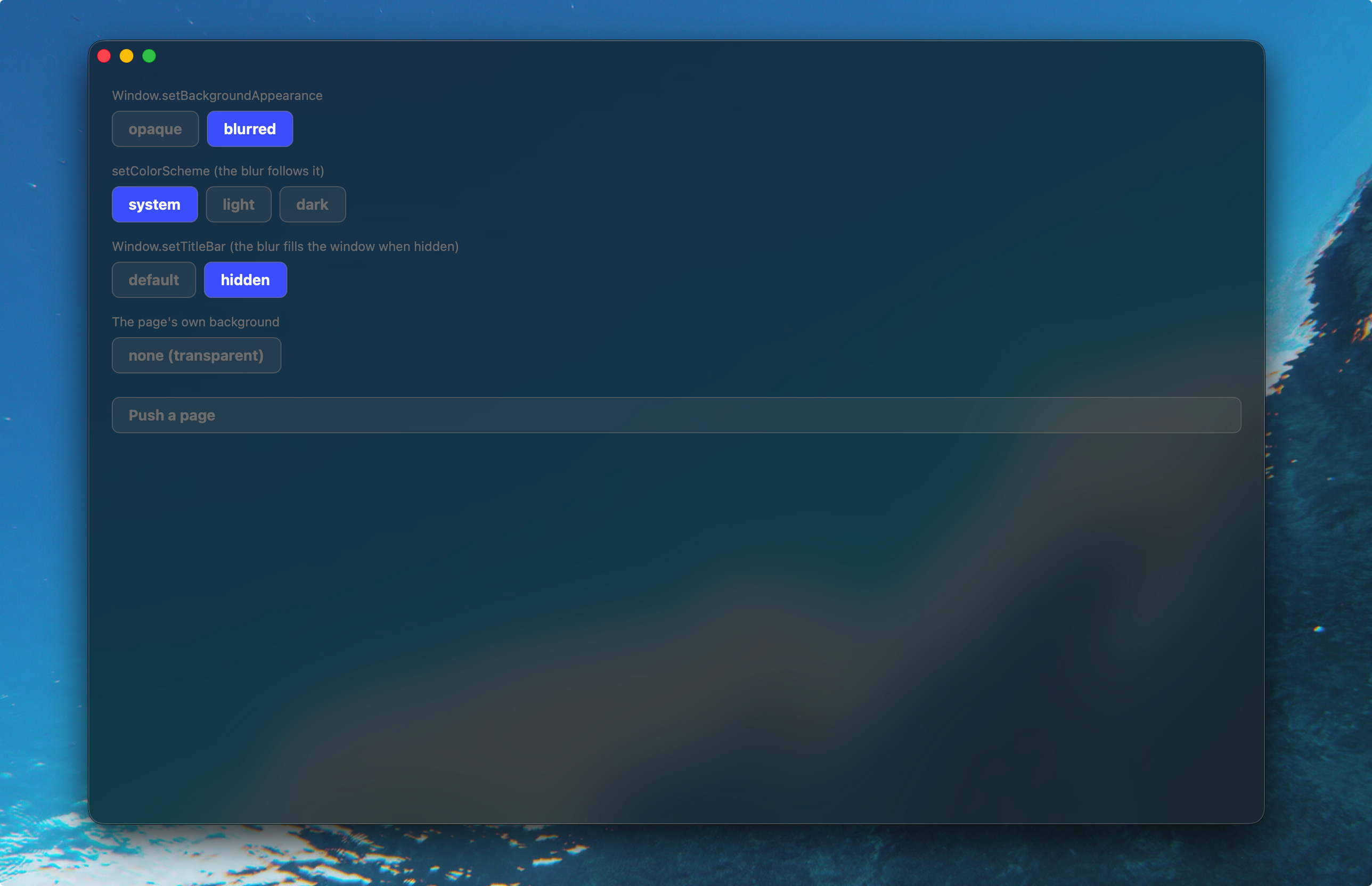
  • Verified the visual appearance with the examples/window-blur application:

macOS window background blur with NavStack

Please review again.

@codex review

@chatgpt-codex-connector

Copy link
Copy Markdown

Codex Review: Something went wrong. Try again later by commenting “@codex review”.

An unknown error occurred
ℹ️ About Codex in GitHub

Your team has set up Codex to review pull requests in this repo. Reviews are triggered when you

  • Open a pull request for review
  • Mark a draft as ready
  • Comment "@codex review".

If Codex has suggestions, it will comment; otherwise it will react with 👍.

Codex can also answer questions or update the PR. Try commenting "@codex address that feedback".

@TianZuo555

Copy link
Copy Markdown
Author

@codex review

@TianZuo555

Copy link
Copy Markdown
Author

@huacnlee
plz take a look when you have time, thank you for your time!

Add Window.setBackgroundAppearance("opaque" | "blurred") to
nsh/desktop, matching GPUI's WindowBackgroundAppearance. On macOS,
"blurred" displays the sidebar material behind the content view.

Position the backdrop at the back of the content view instead of
NSThemeFrame. Under a hidden title bar, the content view fills the
window, so the blur covers the title bar area. The system title bar
keeps its default appearance when shown.

Make navigation page backdrops transparent while the window is
blurred. This exposes the blur behind unstyled pages. Ensure that
the backdrop color updates during the initial mount batch and
subsequent appearance changes.

Reset the window background when the app stops. A new app loaded into
the view starts with an opaque background.
@TianZuo555
TianZuo555 force-pushed the feat/macos-window-material branch from 9a53bf3 to 278befd Compare October 29, 2026 09:57

This branch has not been deployed

No deployments
Sign up for free to join this conversation on GitHub. Already have an account? Sign in to comment

Labels

None yet

Projects

None yet

Development

Successfully merging this pull request may close these issues.

Feature request: macOS window translucency / vibrancy material

2 participants