Repository navigation
Conversation


The core already sends the app's design tokens to the platform (Command::Tokens),
which Linux's menus take their colors from. Android passed over them, so its
alerts and action sheets drew in the wallpaper's colors (Material You), whatever
the app's palette.

SystemUi now fills the system dialog's shape with `popover`, writes the title
and options in `popover-foreground`, the message in `muted-foreground`, the
buttons in `primary` and a destructive action in `destructive`, light or dark
as the appearance shown. An app without a theme of its own (its tokens the
default theme's) keeps the system's colors, as on iOS.
UIKit draws an alert's regular and cancel actions in its tint, which iOS 17
leaves the system blue in an app of any palette. With a theme of its own, the
app's `primary` is now the alert's tint (light or dark as shown); destructive
actions stay red, and an app without a theme keeps the system's. iOS 26's
alerts do not use the tint and look as before.


| static APPEARANCE: Cell<UIUserInterfaceStyle> = const { Cell::new(UIUserInterfaceStyle::Unspecified) }; | ||
| /// The tint of alerts and action sheets: the app theme's `primary` | ||
| /// (`None`: the system's, for an app without a theme of its own). | ||
| static ALERT_TINT: Cell<Option<nsh_core::element::AdaptiveColor>> = const { Cell::new(None) }; |
There was a problem hiding this comment.
[P2] Keep alert tint scoped to its surface. ALERT_TINT is shared by every iOS mounter on the UI thread, so after surface B updates its theme, a dialog from surface A uses B’s color because tokens are only resent when they change. Store the tint on Mounter, pass it into show_dialog, and add a two-surface regression test.
There was a problem hiding this comment.
Fixed in 99f223c. The thread-local is gone: each iOS Mounter keeps alert_tint from its own Command::Tokens and passes it to show_dialog. Android already kept dialogColors on each Mounter.
Mounter::new needs a MainThreadMarker, which libtest's threads don't have, so the test covers the value each Mounter now holds: a_surfaces_alert_tint_comes_from_its_own_tokens. On the iOS 17.0 simulator the themed alert still draws Cancel #26251E and Delete #FF3B30, and the dark action sheet #EDECE6 and #FF453A.
The tint of alerts and action sheets lived in a thread-local shared by
every surface, and the core sends a surface's tokens only when they
change: after one surface's tokens arrived, another surface's dialogs
took its color. Each Mounter now keeps the tint of its own tokens and
passes it to show_dialog.


Description
An app that sets a theme in
nsh.jsongets it everywhere except its confirm dialogs. Android drawsAlertDialog.showin the wallpaper's colors (Material You; seen on Android 15): a lilac card with blue buttons. iOS 17 draws the buttons in system blue. In an app drawn in black and white, the confirm dialog is the one screen that looks like another app's. Linux's menus already take the app's design tokens.The core already sends those tokens to every platform (
Command::Tokens); Android and iOS passed over them. Now they use them, and an app without a theme of its own keeps the system's colors on both: when the tokens are the default theme's (nsh_base::tokens_of(None)), nothing changes.Android colors the whole dialog:
popoverpopover-foregroundmuted-foregroundprimarydestructiveactiondestructiveThe dialog keeps the system's shape, corners, insets, type and ripple; only the colors change, light or dark as the appearance shown. Material's dialog guidance lists color among what an app may customize.
encode.rssends the five tokens' light and dark values as command 27,Mounterkeeps them, andSystemUi.dialogtints the background drawable and colors the texts and buttons.iOS sets the
tintColorof the alert or action sheet toprimary. The HIG's Color page names "choosing your brand color as the app accent color", andtintColoris a publicUIViewproperty, so this leaves the controller's private view hierarchy alone. UIKit then draws the regular and cancel actions in the tint; destructive actions stay system red. iOS 26 alerts don't use the tint, so they look as before there.Independent of #741 (TabBar tint): both touch
Mounter.javaand the iOSmount.rs, and they merge cleanly in either order.Screenshots
Android 15 emulator, an app whose theme sets
popover#FCFCFA,primary#26251E anddestructive#CF2D56 (dark: #1F1E1A, #EDECE6, #F0627E):iOS 17.0 simulator, same theme:
iOS 26.3 simulator, after (same as before):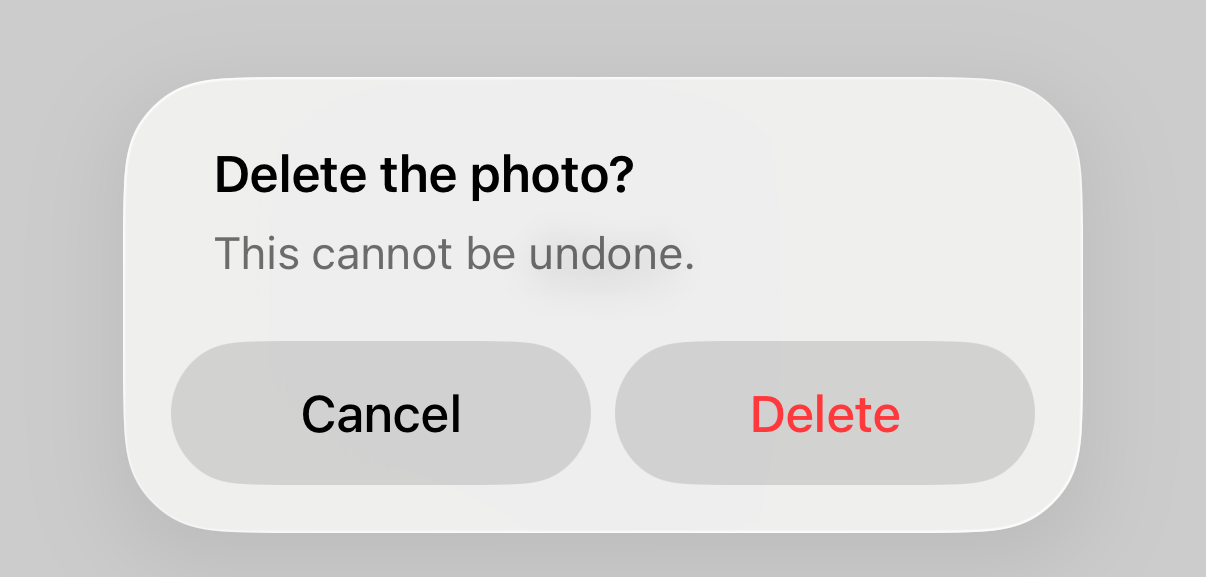
Public API
None.
Breaking Changes
None. An app without a theme in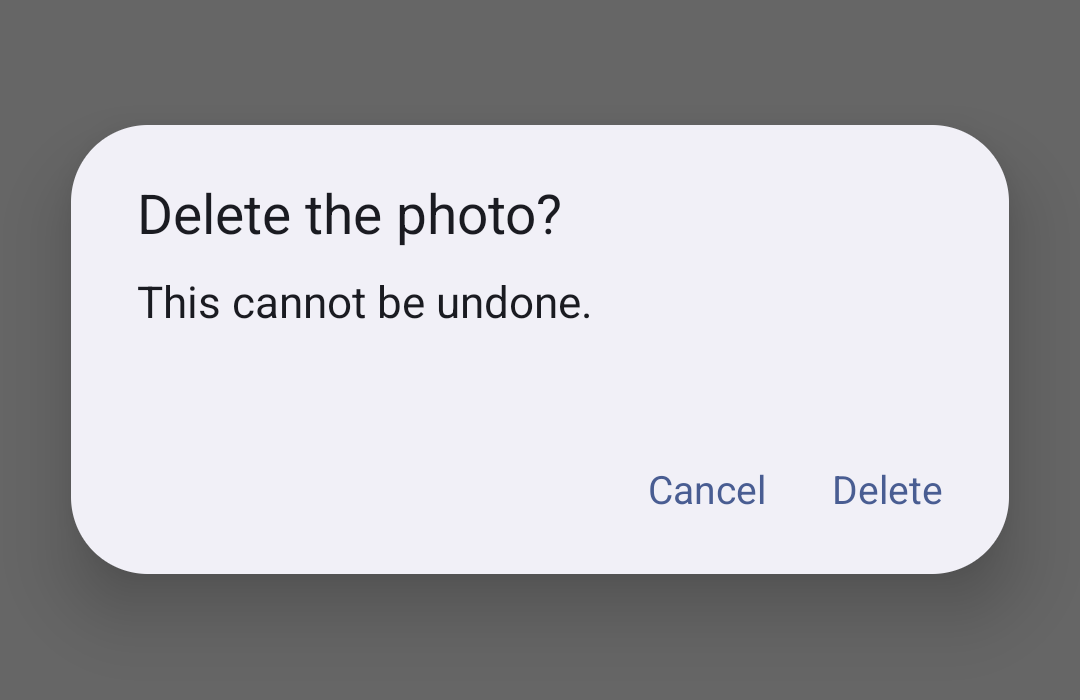
nsh.jsonlooks as before:How to Test
nsh.jsonand a button that callsAlertDialog.showwith acanceland adestructiveaction.nsh run App.tsx --target android, tap the button, in light and in dark mode. The dialog ispopover, the cancel buttonprimary, the destructive onedestructive.nsh run App.tsx --target ioson an iOS 17 simulator, same steps. The cancel button isprimary, the destructive one system red.I checked these by reading the pixels of the screenshots:
A test that answers the dialog with
app.onDialog(() => "Delete")still passes on the Android emulator.Ran:
cargo test --workspace(passes),cargo xtask android --release --dev --abi arm64-v8a,cargo xtask clippy-android(clean), clippy for the Catalyst target (clean),rustfmt +nightly --checkon the changed Rust files.Checklist
cargo test --workspace,cargo +nightly fmt --alland clippy (including the Catalyst and Android runs for platform code).tests/compat/(cargo xtask compat): no API change, so no case.examples/gallerydemos on iOS and Android (if the change is visible or platform-specific).