


A Docker + vcpkg starter stack for distributed C++ microservices — gRPC, Protocol Buffers, and Apache Cassandra, wired together and verified working.
This is a template, not a finished application: it gives you a working coordinator/worker architecture, vcpkg-based dependency management, multi-stage Docker builds, and a CI/CD pipeline that publishes to GHCR, with an example parsing pipeline standing in for whatever business logic you're actually building. It's a solid starting point for prototyping, learning, or bootstrapping a new service — it is not hardened for production as-is (no auth, no TLS, no tests yet — see Known Limitations / Roadmap).
- Features
- What's Inside?
- Known Limitations / Roadmap
- Using Prebuilt Images (Recommended)
- Quick Start (Local Development)
- VS Code Dev Container
- Verify It Works
- Use Cases
- Configuration
- Customizing for Your Project
- Project Layout
- Screenshots
- Advanced / Production Deployment (Kubernetes / Minikube)
- Troubleshooting
- Contributing
- License
- Additional Resources
| 📦 Pre-built images on GHCR | No local compilation needed — docker compose up -d pulls ready-to-run images |
| 🐳 Multi-stage Docker builds | ~170–190MB final images, down from multi-GB dev images |
| 🔧 vcpkg manifest mode | Identical library versions across every service, built once in a shared base image |
| ⚡ gRPC + Protocol Buffers | C++17, generated stubs baked into the base image |
| 🗄️ Apache Cassandra integration | Pre-configured schema and driver, wired up in docker-compose.yml |
| 🖥️ Web UI for data inspection | cassandra-web on port 3000 |
| 🧑💻 VS Code Dev Containers | Full C++ toolchain + gdb, attached to the running stack |
| 🔄 Automated CI/CD | GitHub Actions builds, validates, and publishes on every push/release |
| ❤️ Health checks | Cassandra readiness gates coordinator/worker startup in Compose |
| 🧩 Example implementation included | A distributed parsing pipeline with Cassandra storage, ready to run or replace |
This is a template with a working example, not a ready-made product:
- Coordinator: an example gRPC server that distributes tasks to workers — replace with your own orchestration logic
- Worker(s): example gRPC clients that fetch and parse data (via curl + libxml2) and write results to Cassandra (3 replicas by default) — replace with your own business logic
- Cassandra: a pre-configured NoSQL store for results
- Web UI:
cassandra-web, for visualizing stored data - Infrastructure: a working Docker/CI setup around all of the above — see Known Limitations / Roadmap for what it doesn't cover yet
                     ┌────────────────────┐
                     │      Browser       │
                     │  localhost:3000    │
                     └─────────┬──────────┘
                               │ HTTP
                               ▼
┌─────────────────┐   gRPC   ┌──────────────┐   gRPC   ┌──────────────┐
│  cassandra-web   │◄──CQL───┤  coordinator │◄────────►│    worker    │
│   (Streamlit)    │         │  :50051      │  (x3)    │  (x3 pods)   │
└────────┬─────────┘         └──────────────┘          └──────┬───────┘
         │ CQL                                                │ CQL
         ▼                                                    ▼
                     ┌─────────────────────┐
                     │      Cassandra      │
                     │  keyspace: parser   │
                     └─────────────────────┘
The coordinator hands out tasks over gRPC; workers pull a task, execute it (fetch + parse in the example implementation), write the result straight to Cassandra, and report completion back to the coordinator. Swap out what happens inside "execute it" and the rest of the architecture — service discovery, health checks, image builds, CI — keeps working unchanged.
Pinned/observed from an actual build of this repo's docker/Dockerfile.vcpkg — check vcpkg.json and the workflow logs for the current resolved versions, since vcpkg's baseline moves forward over time:
| Component | Version | Source |
|---|---|---|
| Base OS | ubuntu:22.04 |
docker/Dockerfile.vcpkg |
| gRPC | 1.81.1 | vcpkg port grpc |
| Protobuf | 6.33.4 (protoc 33.4.0) | vcpkg port protobuf |
| Cassandra C/C++ driver | 2.17.1 | built from source, pinned in docker/Dockerfile.vcpkg (no official vcpkg port) |
| C++ standard | C++17 | coordinator/CMakeLists.txt, worker/CMakeLists.txt |
| Package manager | vcpkg (manifest mode, x64-linux triplet) |
vcpkg.json |
- Skip weeks of Docker/vcpkg/gRPC configuration
- Start from a working multi-service architecture (includes a runnable example pipeline)
- Prebuilt images mean no local C++ toolchain is required to try it
- Learn multi-stage builds, vcpkg manifest mode, and GHCR publishing by example
- Replace the example parsing logic with your own business logic when you're ready
Being upfront about scope: this is infrastructure and an example pipeline, not a hardened product. Specifically, as of now:
Security
- No authentication/authorization on the gRPC services.
- No TLS between coordinator/worker — channels are created with
InsecureChannelCredentials. - No TLS to Cassandra, and
docker-compose.ymlships a defaultCASSANDRA_PASSWORD=cassandrain plaintext (fine for local dev, not for anything internet-facing).
Reliability / data model
- The coordinator's task queue is an in-memory
std::vector(coordinator/coordinator.h) — it's lost on restart, and the coordinator can't be scaled to more than one replica without workers seeing inconsistent queues. - Cassandra runs as a single node with
replication_factor: 1(cassandra/setup.cql) and no data volume indocker-compose.yml— stored results don't survivedocker compose down -v. - Of the 5 tables
cassandra/setup.cqldefines, onlyparsed_resultsis actually written to by the example worker code — the rest (task_requests,task_results,submitted_tasks,result_acks) are schema only.
Operations
- No gRPC health-check protocol on coordinator/worker (only Cassandra has a container healthcheck).
- No graceful shutdown —
server->Wait()blocks indefinitely; in-flight tasks are lost on a restart/redeploy. - No structured logging, metrics, or tracing — just
std::cout/std::cerr. - No retry/backoff strategy on the worker beyond a flat 1-second sleep when the queue is empty.
Testing
- No unit or integration tests exist yet.
.github/workflows/ci.ymlvalidates that the stack builds and starts, not that it behaves correctly.
None of this blocks using the template to learn from or prototype with — it's exactly the kind of thing you'd expect to add as a project built on this template matures, and the list above should save you from having to rediscover it yourself.
docker-compose.yml is set up by default to pull ready-to-run images from GitHub Container Registry instead of compiling anything locally. Every push to main and every release rebuilds and republishes them via .github/workflows/publish-ghcr.yml.
docker compose up -dThat's it — no C++ compiler, no vcpkg, no waiting for grpc/protobuf/abseil/the Cassandra driver to build from source. Compose pulls ghcr.io/neuracollab/coordinator:latest and ghcr.io/neuracollab/worker:latest and starts the full stack (Cassandra, cassandra-web, coordinator, 3 worker replicas) in seconds.
Open the web interface at http://localhost:3000, and tear it down with:
docker compose downIf you're changing the C++ code and need to build the images yourself, see Quick Start (Local Development) below.
Use this path when you're modifying the coordinator/worker C++ code and need to build the images yourself, rather than pulling the prebuilt ones above.
- Docker with Compose v2 (
docker compose) - No local C++ toolchain, CMake, or vcpkg installation required — everything compiles inside the
base-vcpkgbuild in the next step
First time, or whenever vcpkg.json changes:
docker build -f docker/Dockerfile.vcpkg -t base-vcpkg:latest .This compiles the vcpkg manifest's dependencies once. It's the slow step (expect it to take a while the first time); Docker's layer cache makes every rebuild after that instant unless vcpkg.json changes.
In the coordinator and worker services, comment out the image: line and uncomment the build: block underneath it.
docker compose up --buildThis builds coordinator and worker on top of base-vcpkg and starts Cassandra, cassandra-web, the coordinator, and 3 worker replicas.
http://localhost:3000
docker compose downA .devcontainer/ is included, wired to the same docker-compose.yml. Open the repo in VS Code and choose Reopen in Container.
Included out of the box:
- C++ IntelliSense (
ms-vscode.cpptools) - CMake Tools (
ms-vscode.cmake-tools) - Docker support (
ms-azuretools.vscode-docker) - A container attached to the
builderstage (full toolchain +gdb), connected to the running Cassandra instance
docker compose psExpected: cassandra reports healthy, and coordinator / worker are Up.
docker compose logs coordinator worker- Learning: understand how C++ gRPC microservices talk to each other and to Cassandra, without first having to figure out how to wire vcpkg, multi-stage Docker, and CI together yourself
- Prototyping: quickly test a distributed system idea — coordinator/worker fan-out, a shared Cassandra store, a web UI — without setting up infrastructure by hand
- Production base: extend it with your own C++ business logic and ship it through the same CI/CD pipeline that already builds, validates, and publishes images on every push
- Teaching: demonstrate modern C++ containerization (vcpkg manifest mode, multi-stage builds, GHCR publishing) end to end, with a runnable example instead of slides
Example applications you can build on top of this template:
- Data parsing and ETL pipelines (the example included in this repo)
- Real-time data processing pipelines
- Distributed task queues
- Microservices with shared state in Cassandra
- High-performance backend services
- Web scraping and content aggregation systems
A typical loop for extending this template looks like:
- Edit C++ source under
coordinator/orworker/(or both). - Rebuild and run locally via the Quick Start (Local Development) path.
- Verify with
docker compose ps/docker compose logs, same as in Verify It Works. - Push to a branch and open a PR —
.github/workflows/ci.ymlbuilds the images and brings the full stack up in CI to catch regressions. - Merge to
main—.github/workflows/publish-ghcr.ymlrebuilds and republishescoordinatorandworkerto GHCR automatically, sodocker compose up -don the prebuilt-images path picks up the change for anyone who pulls again.
Everything below is currently hardcoded in source or in docker-compose.yml — there's no environment-variable layer wired in yet. This table exists so you know exactly what to change and where, rather than pretending it's already configurable:
| Setting | Current value | Where it's defined |
|---|---|---|
| Cassandra contact point | cassandra |
hardcoded in worker/worker.cpp (cass_cluster_set_contact_points) |
| Cassandra native port | 9042 (driver default) |
not overridden anywhere in code |
| Coordinator gRPC listen address | 0.0.0.0:50051 |
hardcoded in coordinator/main.cpp |
| Worker → Coordinator address | coordinator:50051 |
hardcoded in worker/main.cpp |
| Worker replica count | 3 |
docker-compose.yml (deploy.replicas) |
| Web UI host port | 3000 |
docker-compose.yml (cassandra-web port mapping) |
.env.exampleat the repo root sketches out env vars for a future config-driven setup (COORDINATOR_PORT,WORKER_PORT,CASSANDRA_SEEDS, etc.), but none of them are actually read by the running services yet. Wiring these up viagetenv/argvis a good first customization — see below.
- Replace the example parsing logic: edit
coordinator/main.cpp/coordinator/coordinator.cppandworker/main.cpp/worker/worker.cppto implement your own business logic instead of the example fetch-parse-store pipeline. - Update proto definitions: modify
proto_files/task.proto, then rebuild the base image so the generated stubs pick up the change:docker build -f docker/Dockerfile.vcpkg -t base-vcpkg:latest . - Add vcpkg dependencies: edit
vcpkg.json, then rebuild the base image the same way. - Change the Cassandra schema: edit
cassandra/setup.cqlto match your data model. - Remove the example parsing code: if your project doesn't need HTTP fetching or HTML parsing, drop the
curl/libxml2usage inworker/page_fetcher.*andworker/html_parser.*, and the corresponding entries invcpkg.json.
vcpkg.json               # manifest: grpc, protobuf, abseil, curl, libxml2
docker/Dockerfile.vcpkg   # shared base image: toolchain + vcpkg deps + generated proto stubs
coordinator/Dockerfile    # multi-stage build -> minimal runtime image
worker/Dockerfile         # multi-stage build -> minimal runtime image
proto_files/              # .proto definitions (example: task distribution)
coordinator/              # example gRPC server (task distribution logic)
worker/                   # example gRPC client (parsing + Cassandra write)
cassandra/                # Cassandra init scripts (setup.cql)
docker-compose.yml        # local dev stack
.github/workflows/        # CI/CD: docker-compose validation + auto-publish to GHCR
.devcontainer/            # VS Code development environment
kubernetes/               # K8s manifests for production deployment
CONTRIBUTING.md           # dev environment setup + PR guidelines
LICENSE                   # MIT
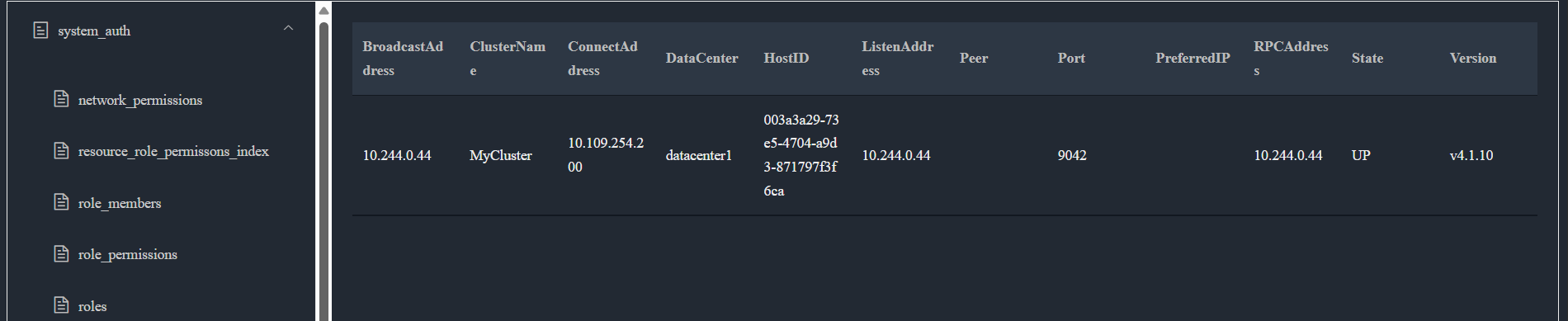
This screenshot is from the cassandra-web UI reachable at http://localhost:3000 after docker compose up -d.
There's currently no screenshot of the docker compose ps output itself — see below if you'd like to add one.
- Run
docker compose up -dand wait fordocker compose psto reporthealthy. - Take a screenshot of whatever you're documenting (terminal output, a browser window, etc.) and save it under
assets/. - Reference it in this README with the full raw URL (
https://raw.githubusercontent.com/neuraCollab/cassandra-grpc-dev/main/assets/<file>.png), not a relative path — relative paths only render on GitHub's own file viewer, not when this README is copied/shared elsewhere. - Commit:
git add assets/ && git commit -m "docs: update screenshots". - Recommended resolution: 1200×675 (16:9).
Running on Kubernetes (via Minikube for local cluster testing) is supported for production-like deployments, but it's not the recommended path for day-to-day development — Minikube's RAM footprint and slower startup add friction that docker compose avoids.
💡 Windows users: Use WSL2 for best experience.
chmod +x start.sh
./start.sh
This builds the base + service images, generates gRPC code, starts Minikube, loads images into the cluster, creates the Cassandra init config, and deploys everything under kubernetes/.
# 1. Build the shared base image and service images
docker build -f docker/Dockerfile.vcpkg -t base-vcpkg:latest .
docker build -f coordinator/Dockerfile -t distributed_parser-coordinator ./coordinator
docker build -f worker/Dockerfile -t distributed_parser-worker ./worker

# 2. Start Minikube
minikube start

# 3. Load images into Minikube
minikube image load distributed_parser-coordinator:latest
minikube image load distributed_parser-worker:latest

# 4. Create Cassandra init config
kubectl create configmap cassandra-setup --from-file=setup.cql=./cassandra/setup.cql

# 5. Deploy everything
kubectl apply -f ./kubernetes/ --recursive

# 6. Access the Web UI
kubectl port-forward deployment/cassandra-web 8083:8083
# → Open http://localhost:8083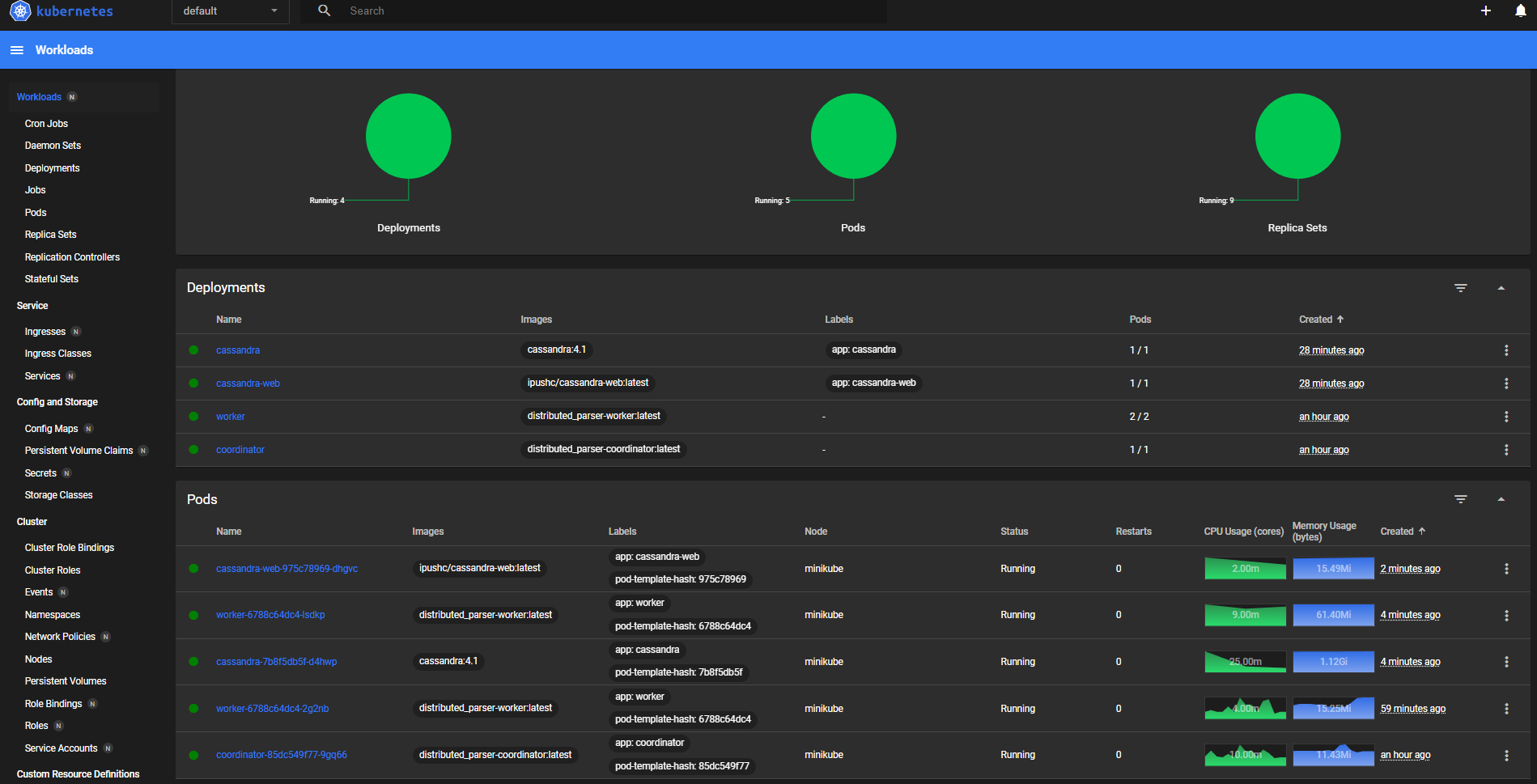
📌 Tip: Run
minikube dashboardto monitor pods, services, and logs in real time.
kubectl get podsNAME READY STATUS RESTARTS AGE
cassandra-xxxxx 1/1 Running 0 2m
cassandra-web-xxxxx 1/1 Running 0 2m
coordinator-xxxxx 1/1 Running 0 2m
worker-xxxxx 1/1 Running 0 2m
- Cassandra runs out of memory → reduce limits (see
kubernetes/cassandra/cassandra-deployment.yamlfor the K8s path, or add resource limits under thecassandraservice indocker-compose.ymlfor local dev). - gRPC/proto issues → verify
.protofiles are inproto_files/and rebuildbase-vcpkgso the generated stubs pick up the change. - A service fails to build against
base-vcpkg:latest→ make sure you built it first — Compose does not build it automatically since it's referenced only viaFROM, not as a compose service. - Port 3000 is busy → change the host-side port mapping for
cassandra-webindocker-compose.yml. - BuildKit cache issues / stale layers →
docker builder prune. - The example parsing worker fails → check that
curl/libxml2are present in the base image (they're part of thevcpkg.jsonmanifest); a rebuild ofbase-vcpkgafter anyvcpkg.jsonedit usually fixes it.
Resource requirements:
- Minimum: 4GB RAM, 2 CPU cores
- Recommended: 8GB RAM, 4 CPU cores (for 3 worker replicas plus Cassandra)
- Fork the repo
- Create your feature branch (
git checkout -b feature/amazing-feature) - Commit your changes (
git commit -m 'Add some amazing feature') - Push to the branch (
git push origin feature/amazing-feature) - Open a Pull Request
Opening a PR against main automatically runs .github/workflows/ci.yml, which builds coordinator/worker from your branch and brings the full stack up with docker compose — so a broken build or a service that fails to start shows up before review, not after merge.
See CONTRIBUTING.md for a more detailed dev environment walkthrough and code style notes.
This project is licensed under the MIT License — see the LICENSE file for details.
proto_files/task.proto— the example service/message definitionsvcpkg.json— the dependency manifest.github/workflows/publish-ghcr.yml— the GHCR publish pipelinecassandra/setup.cql— the example Cassandra schema